Free, easy software for your TTC450 Ultra
The TTC450 Ultra is the newest of the Two Trees 450 machines: 460 × 460 mm of bed, 100 mm of Z, a 500 W spindle and a touchscreen control box. TwoTrees lists paid and third-party CAM programs for it. Surfacecraft is a free one that runs in your browser, with a TTC450 Ultra preset and feeds and speeds worked out for that spindle.
For the TTC450 Ultra. Nothing to install. Mac, Windows, Linux and Chromebook. Updated .- Work area
- 460 × 460 × 100 mm
- Firmware
- Open-source GRBL
- Spindle
- A 500 W spindle, 12,000 rpm on TwoTrees' spec sheet, with an ER11 collet. Check that your $30 setting matches, so the speeds in the G-code come out right.
- Preset
- TwoTrees TTC450 Ultra
- Output
- G21 G90 G94 · M3 S… · one .nc per bit
What to know about the TwoTrees TTC450 Ultra
A 3,000 mm/min top speed
That's the Ultra's rated maximum, so Surfacecraft keeps every feed under it. Pick the bit and the material and the numbers below are what the editor suggests.
Check your collet for ¼″ bits
The ER11 collet system takes 0.5–7 mm tools, depending on the collet fitted. Use a ¼″ collet for the ¼″ column in the feeds table, and a ⅛″ collet for the smaller bits.
CNC and laser on one machine
TwoTrees sells a laser module for it. Burn Studio is in the same free account and has a generic diode laser preset, so you can design for both without changing software.
TwoTrees TTC450 Ultra feeds and speeds to start with
Starting points for solid carbide 2-flute end mills, worked out for the TwoTrees TTC450 Ultra preset and kept under its 3,000 mm/min top speed. They're the numbers Cut Studio suggests when you pick the bit and material.
| Material | ⅛″ 2-flute end mill | ¼″ 2-flute end mill |
|---|---|---|
| Softwoodpine, spruce, fir | 1,620 mm/min 7,500 rpm · 1.51 mm per pass | 3,000 mm/min* 7,425 rpm · 3.02 mm per pass |
| Hardwoodsoft maple, cherry, walnut | 1,230 mm/min 7,500 rpm · 1.51 mm per pass | 2,670 mm/min 7,500 rpm · 3.02 mm per pass |
| Plywoodbaltic birch, birch plywood, cabinet plywood | 1,500 mm/min 7,500 rpm · 1.51 mm per pass | 2,850 mm/min 7,500 rpm · 3.02 mm per pass |
| MDF / particle boardmdf, hdf, particle board | 1,800 mm/min 7,500 rpm · 1.51 mm per pass | 3,000 mm/min* 6,578 rpm · 3.02 mm per pass |
| Acrylicacrylic, cast acrylic, plexiglass | 1,050 mm/min 7,500 rpm · 1.27 mm per pass | 1,620 mm/min 7,500 rpm · 2.54 mm per pass |
Chiploads come from bit makers' published ranges (Onsrud, Amana Tool, Whiteside), kept at the gentle end for hobby machines. * The machine's top speed holds the feed here, so the spindle is slowed to keep the chips thick. Every machine and bit is a little different: listen for chatter on a test cut and adjust.
From box to first cut
Surfacecraft makes the G-code. A sender runs it: gSender or Universal Gcode Sender (both free), or Surfacecraft itself over USB with Pro.
-
01
Create a free account Open Cut Studio in your browser. Nothing to download.
-
02
Add your machine Pick the TwoTrees TTC450 Ultra preset. Check the top speed against your manual.
-
03
Make a design Draw text and shapes or import an SVG. Give each shape a depth, a cut and a bit.
-
04
Check the 3D preview It's built from the real G-code, so what you see is what the bit will do.
-
05
Download and run Load the bit the file's header names, zero where it says, and run it in your sender.
TwoTrees TTC450 Ultra test G-code
A first cut to check your machine before you design anything: a 40 × 30 mm pocket and a 40 × 30 mm outline, both 3 mm deep, with a ⅛″ 2-flute end mill in pine. Made by Cut Studio with the TwoTrees TTC450 Ultra preset, at the softwood numbers in the table above, and it runs in about 2 minutes.
Clamp a piece of pine at least 100 × 60 × 6 mm. Zero X and Y on its front-left corner and Z on its top, then run the file in your sender.
A carved sign with a frame
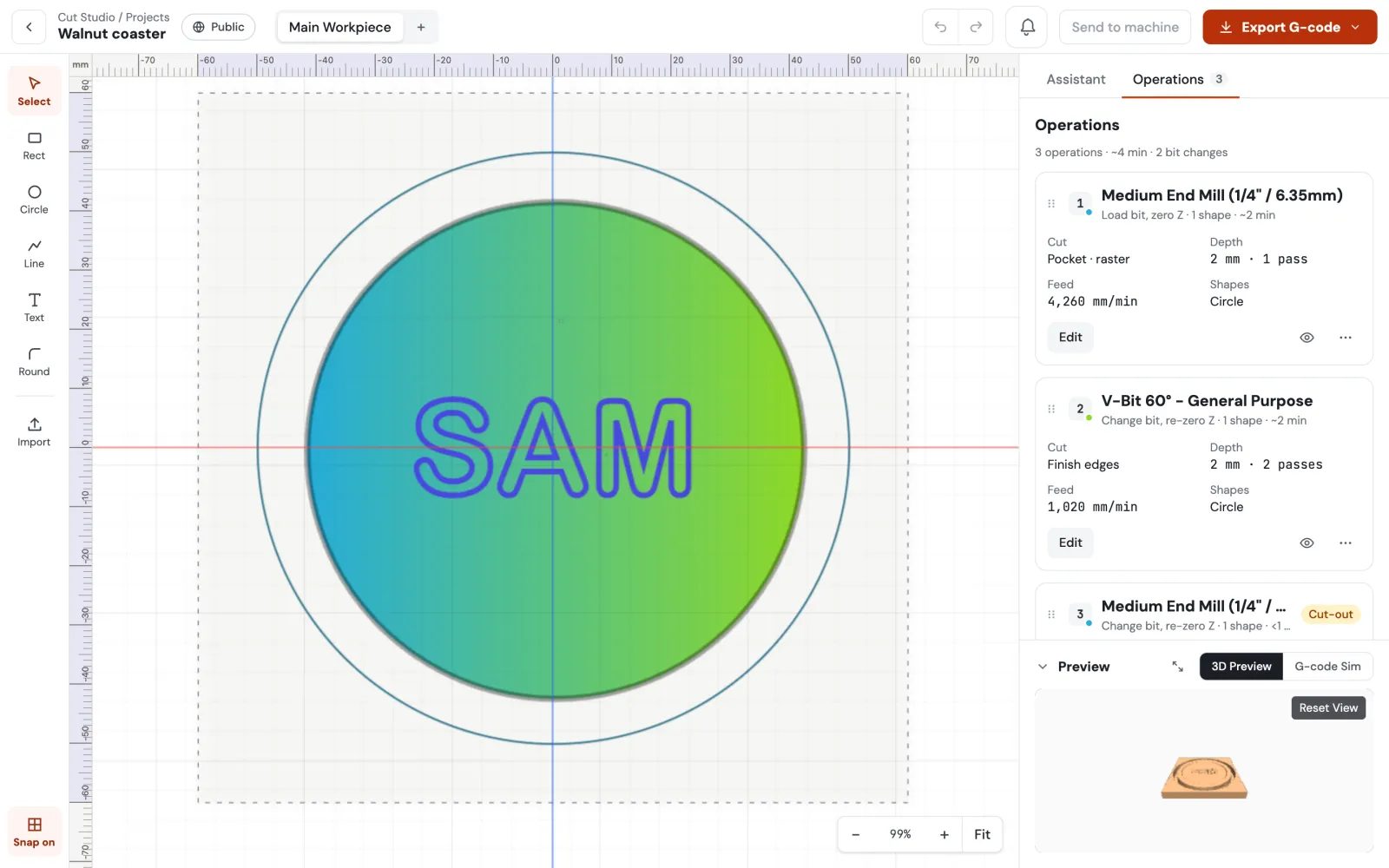
At 460 mm wide there's room for a sign and its frame in one job. Pocket the background with a ¼″ end mill, finish the letters with a 60° V-bit and cut it out with holding tabs.
TwoTrees TTC450 Ultra software questions
TwoTrees lists VCarve, Fusion 360, Easel, Carveco Maker and others. The machine runs open-source GRBL and takes .nc and .gcode files, so Surfacecraft works too: it is free, runs in the browser and has a TTC450 Ultra preset.
No. You need software that makes G-code, and it doesn't have to be paid for. Surfacecraft does signs, coasters, cut-outs and V-carving free. It doesn't do 3D relief carving, so if that's what you bought the Ultra for, you'll want one of the programs that does.
Yes. Surfacecraft runs in the browser on Mac, Windows, Linux and Chromebook with nothing to install.
Yes. Designing, toolpaths, the 3D preview and G-code export (5 files a day) are on the Free plan with no time limit. Pro adds unlimited exports, sending jobs straight to the machine, more machines, AI tools and commercial use.
Your TwoTrees TTC450 Ultra is ready. Now it has software.
Design and G-code are free, with no time limit. Send to your machine over USB with Pro.