Free, easy software for your Genmitsu 4040 Reno
The 4040 Reno is SainSmart's belt-driven take on the 4040: a 400 × 400 × 76 mm working area, an all-aluminum frame and a GRBL controller on a 32-bit board. Surfacecraft gives it free design and CAM software in your browser, with a Reno preset and feeds kept to what a 75 W spindle can do.
For the 4040 Reno. Nothing to install. Mac, Windows, Linux and Chromebook. Updated .- Work area
- 400 × 400 × 76 mm
- Firmware
- GRBL, on a 32-bit board
- Spindle
- A 75 W spindle (up to 9,000 rpm) in a mount that takes 42 mm and 52 mm spindles. SainSmart sells a mount for 65–69 mm routers.
- Preset
- Genmitsu 4040 Reno
- Output
- G21 G90 G94 · M3 S… · one .nc per bit
What to know about the Genmitsu 4040 Reno
Belts on X and Y, a lead screw on Z
Belts keep the Reno quick to set up, and SainSmart rates it at ±0.1 mm on X and Y. Light, shallow passes suit it best, so the feeds table below stays under its 2,000 mm/min top speed.
V-bits in the box
SainSmart includes a set of V-cutting bits. Choose a V-bit in Surfacecraft and it works out the depth from the line width, which makes signs and lettering a good first job.
Limit switches and a Z-probe
The Reno has limit switches, an emergency stop and a Z-probe with an LED. Home it, touch off Z, and zero on your stock where the G-code header says.
Genmitsu 4040 Reno feeds and speeds to start with
Starting points for solid carbide 2-flute end mills, worked out for the Genmitsu 4040 Reno preset and kept under its 2,000 mm/min top speed. They're the numbers Cut Studio suggests when you pick the bit and material.
| Material | ⅛″ 2-flute end mill |
|---|---|
| Softwoodpine, spruce, fir | 1,215 mm/min 5,625 rpm · 1.51 mm per pass |
| Hardwoodsoft maple, cherry, walnut | 923 mm/min 5,625 rpm · 1.51 mm per pass |
| Plywoodbaltic birch, birch plywood, cabinet plywood | 1,125 mm/min 5,625 rpm · 1.51 mm per pass |
| MDF / particle boardmdf, hdf, particle board | 1,350 mm/min 5,625 rpm · 1.51 mm per pass |
| Acrylicacrylic, cast acrylic, plexiglass | 788 mm/min 5,625 rpm · 1.27 mm per pass |
Chiploads come from bit makers' published ranges (Onsrud, Amana Tool, Whiteside), kept at the gentle end for hobby machines. Every machine and bit is a little different: listen for chatter on a test cut and adjust.
From box to first cut
Surfacecraft makes the G-code. A sender runs it: the one that came with your kit, gSender or Universal Gcode Sender (all free), or Surfacecraft itself over USB with Pro.
-
01
Create a free account Open Cut Studio in your browser. Nothing to download.
-
02
Add your machine Pick the Genmitsu 4040 Reno preset. Check the top speed against your manual.
-
03
Make a design Draw text and shapes or import an SVG. Give each shape a depth, a cut and a bit.
-
04
Check the 3D preview It's built from the real G-code, so what you see is what the bit will do.
-
05
Download and run Load the bit the file's header names, zero where it says, and run it in your sender.
Genmitsu 4040 Reno test G-code
A first cut to check your machine before you design anything: a 40 × 30 mm pocket and a 40 × 30 mm outline, both 3 mm deep, with a ⅛″ 2-flute end mill in pine. Made by Cut Studio with the Genmitsu 4040 Reno preset, at the softwood numbers in the table above, and it runs in about 2 minutes.
Clamp a piece of pine at least 100 × 60 × 6 mm. Zero X and Y on its front-left corner and Z on its top, then run the file in your sender.
A V-carved shop sign
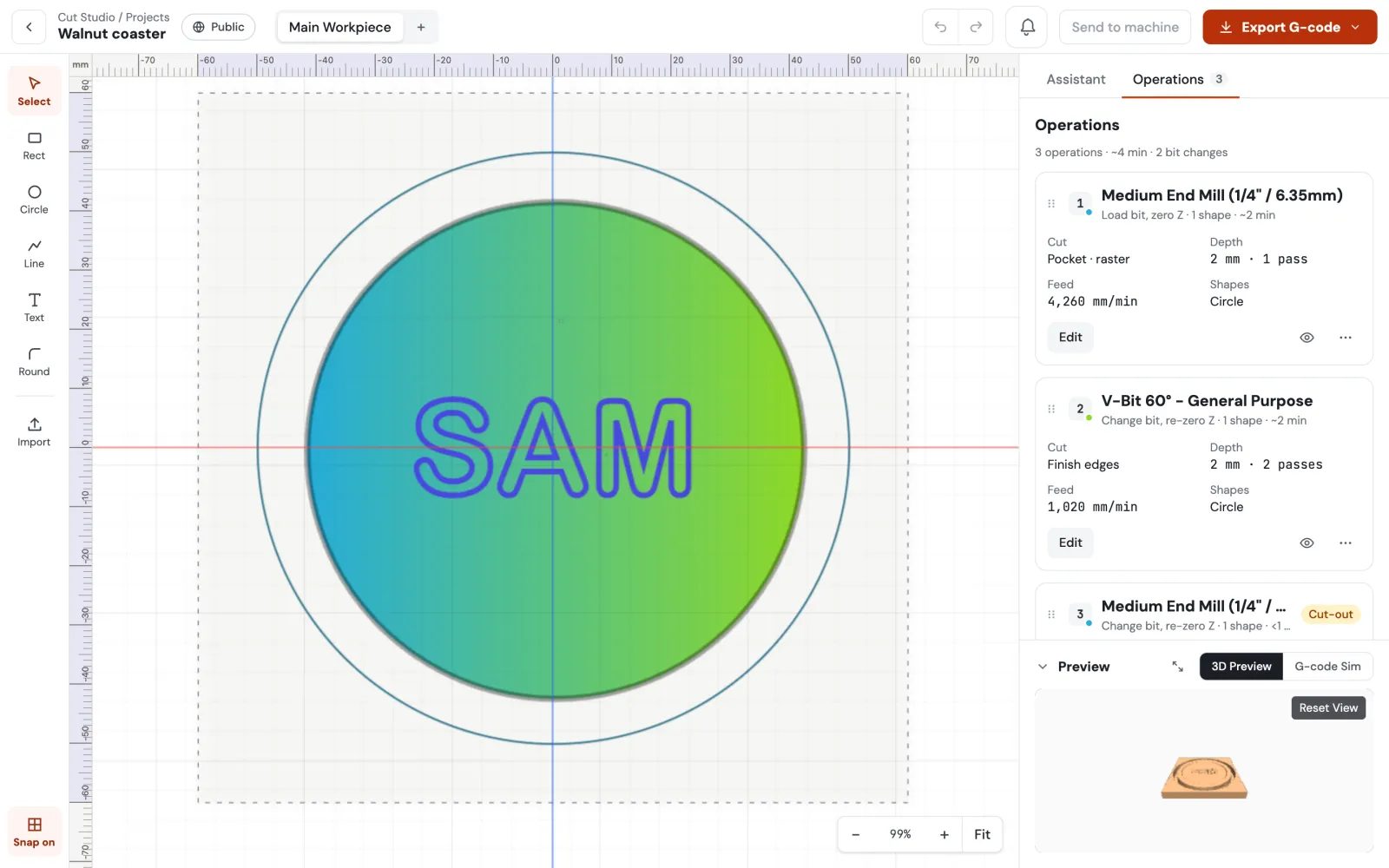
Type a short name, pick a V-bit from the kit and carve it into a pine board. At 400 mm wide there's room for a real sign, and the 3D preview shows every letter before you start.
Genmitsu 4040 Reno software questions
The Reno runs GRBL, so any CAM software that writes GRBL G-code works. Surfacecraft is free, runs in your browser and has a 4040 Reno preset. To run the file, use a free sender such as gSender or Universal Gcode Sender, or send it over USB with Surfacecraft Pro.
No. Both have a 400 mm square bed and a 2,000 mm/min top speed on SainSmart's spec sheets, but the Reno is belt-driven on X and Y with 76 mm of Z. Pick the preset for your machine so the work area is right.
Yes. The mount takes 42 mm and 52 mm spindles, and SainSmart sells a holder for 65–69 mm routers. Change the spindle in your machine settings so the feeds match. A router's speed is set on its own dial, not in the G-code.
Yes. Designing, toolpaths, the 3D preview and G-code export (5 files a day) are on the Free plan with no time limit. Pro adds unlimited exports, sending jobs straight to the machine, more machines, AI tools and commercial use.
Your Genmitsu 4040 Reno is ready. Now it has software.
Design and G-code are free, with no time limit. Send to your machine over USB with Pro.